

See What Your AI Sees
66% of developers call 'almost right' output their top AI frustration. See every tool, vault entry, and context your AI has with fai --preview.
 Michael Gearhardt
See What Your AI Sees
Your AI coding assistant is a black box. You type something. It writes code. Sometimes it's right. Sometimes it's close but not quite. Sonar's 2026 developer survey found 66% of developers call "almost right" output their top AI frustration.
Here's the question nobody asks: what does your AI actually know about your project when it starts writing?
You don't know. You've never been able to know.
The Black Box Problem
ETH Zurich tested context files across eight configurations. In five of them, adding context files actually hurt LLM performance and increased costs by over 20%. The raw context dump doesn't work. Throwing more files at the model makes it worse, not better.
Stack Overflow's 2026 survey tells the same story from the developer side: 54% of developers who manually select context say the AI still misses relevance. That number drops to 16% when context is persistently stored and reused across sessions.
The gap between 54% and 16% is the gap between "pick the right files every time" and "your AI already knows your project." But even in the 16% camp, there's a trust problem. The context is invisible. You take it on faith that the right patterns made it into the right place. If the AI makes a wrong call, you can't check what it was working with.
Every coding tool has this problem. Claude Code, Cursor, Copilot, Windsurf. They read context. You can't see what they read.
One Command. Open Book.
fai --preview
This starts fai's MCP server and opens an inspector in your browser. You can see every tool your AI can call, every vault entry it reads, every piece of context fai has built from your sessions. You can browse. You can call the tools yourself. You can diff what your AI knows against what you thought it knew.
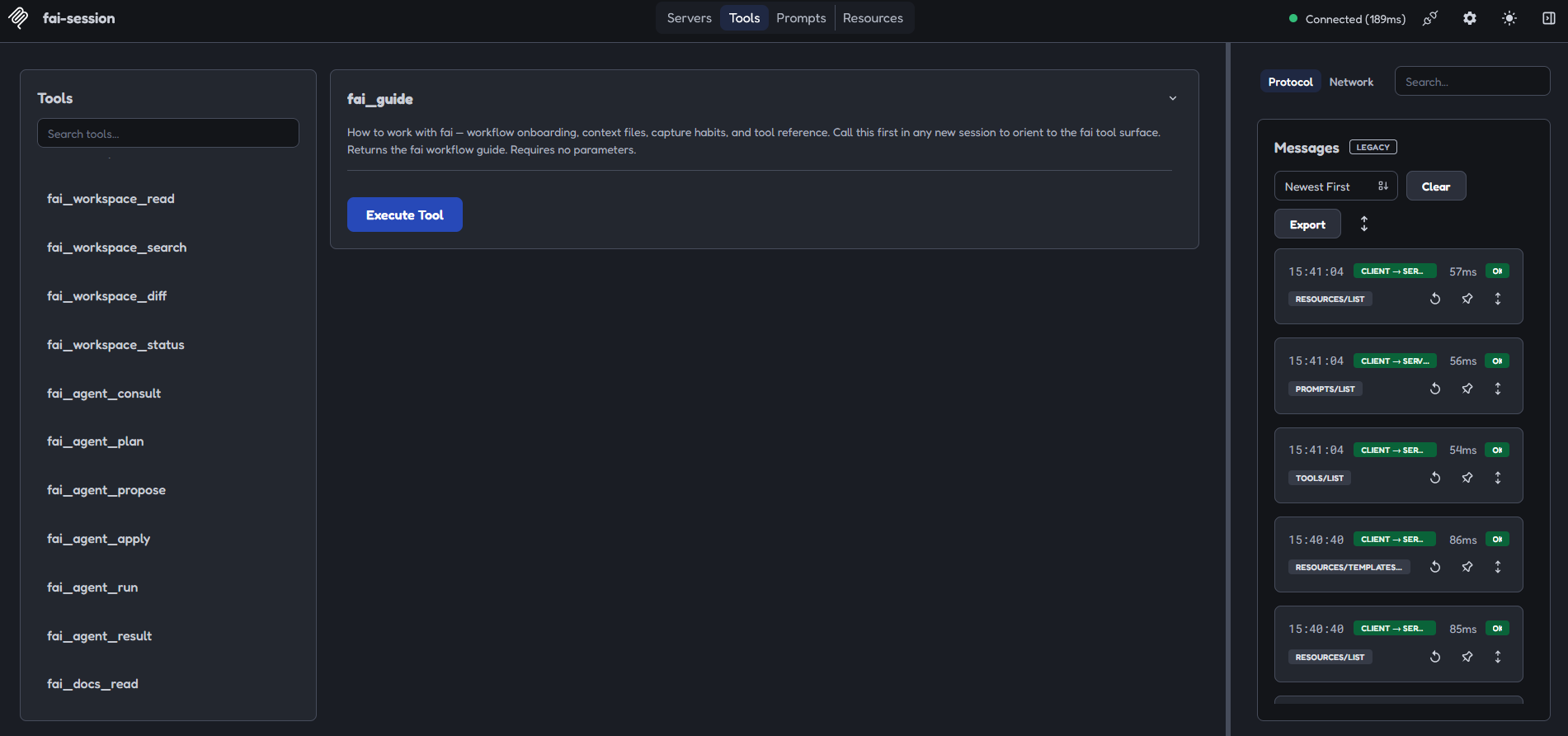
It runs on port 4967 by default. The inspector process is managed by fai. It starts when you do and shuts down when your session ends.
What you're seeing is not a debug view. It's the actual context surface your AI reads before it writes a single line.
What We Learned From Chess Masters
In 1973, Chase and Simon ran an experiment that changed cognitive science. They showed chess positions to masters and novices. Masters could reconstruct the entire board from memory after five seconds. Novices couldn't.
The obvious conclusion: masters have better memory. The actual finding was the opposite. Working memory capacity was identical. Masters and novices both hold four to seven items. The difference was chunk size. A master sees "castled king formation" where a novice sees six independent pieces. Same memory slots. Richer patterns.
This is what fai builds for your AI. Each session, captured decisions and patterns get distilled into reusable chunks. By session 20, your AI speaks your vocabulary without prompting. By session 50, roughly half its responses draw from crystallized context instead of re-deriving everything from scratch. Token costs drop about 10x.
The ETH Zurich result makes sense in this frame. Raw context dumps are noise. Curated, crystallized patterns are signal. The vault holds everything. Your AI sees the distilled version.
Any Agent. Same Brain.
JetBrains' 2026 developer survey found 70% of developers use two to four AI tools simultaneously. 15% use five or more. Only 15% use a single tool.
That means most developers re-explain their project every time they switch tools. Context lives in Claude's memory, or Cursor's rules file, or Copilot's instructions. Each tool starts from zero.
fai writes your project context into each agent's native config before it opens. Claude, Cursor, Cline, Copilot, Windsurf, Codex, Gemini, JetBrains, Goose, Antigravity, OpenCode, Aider, Amazon Q, Continue.dev, OpenMonoAgent. All reading from the same vault. Switch tools without losing your place.
The MCP server is always running. Any MCP-compatible tool can connect and read your vault context in real time. No import, no export, no manual sync.
The Trust Shift
There are three layers to what just shipped.
The first layer is visibility. fai --preview shows you what your AI knows.
That's trust through transparency. You don't have to take our word for it.
The second layer is freedom. Every agent shares one vault. That's trust through portability. Your context isn't locked to one tool. Switch whenever you want. Your vault follows.
The third layer is compounding. Every session, the vault gets richer. Patterns crystallize. Token costs drop. Your AI doesn't just remember your project. It understands your project better than it did yesterday. That's trust through evidence. Open the preview at session 1 and again at session 20. The difference is visible.
None of these layers require configuration. They require showing up and working.
The Invitation
Your vault lives in ~/.fai/. It's local. It's git-backed. It's yours.
deno run -A jsr:@fathym/fai/install
fai --preview
Two commands. See what your AI sees.
Build anything with AI. Keep everything. Evolve forever.
Read more: Google Antigravity Has a Context Problem. fai Fixes It. ->
Two commands. Your vault loads in under 3 seconds.
deno run -A "https://www.fathym.com/fai/install.deno"New posts on AI workbenches, developer ownership, and compounding intelligence — when they're ready, not on a schedule.