
What Is Git-Backed Context in fAI (and What Does Owning It Mean)?
In fAI, git-backed context keeps your AI's understanding of your work in a plain git repo on your machine: what it holds, and what owning it actually buys you.
 Kilian Carroll
What Is Git-Backed Context in fAI (and What Does Owning It Mean)?
Git-backed context means the understanding your AI has built up about your work is yours to keep: no expiry, no export deadline, and nobody else holding the only copy. It lives in ordinary git repositories on your machine, which is what makes that true rather than a promise.
fAI is the workbench that builds that context. It sits under the AI coding tools you already use, captures what happens as you work, and keeps the result on your disk rather than in a vendor's account. This post is about that last part: where it puts things, and what shape they are in.
Where does git-backed context actually live?
In your home directory, under ~/.fai/. fAI keeps a workbench per project, in a folder named for a hash of the project path, with several stores beside it. Each is a separate git repo, and they sit at different distillation levels:
~/.fai/
  captures/                     14,040   every capture, as it happened
  sessions/                      1,124   per-session state
  personal/                        450   preferences that follow you everywhere
    context/  decisions/        ~2,400   commits apiece
    patterns/ petnames/
  workbenches/<project-hash>/      423   your project's synthesized context
    context/  decisions/        ~2,400   commits apiece
    patterns/ petnames/
Those counts are one laptop in mid-August 2026, and the ratio is the point. Two layers sit in there. The synthesis is what your agents read at the start of a session, a small set of files kept current. The record underneath is everything that produced it, one commit per capture. Many captures distill into a small body of current context.
You keep the record for the same reason you keep code history: you cannot know today what you will need to recover, inspect, or ask of it later. The companion piece argues that case at length; this one stays with what is on disk.
The per-item stores exist at both scopes, personal and per-project, so a single project accounts for eleven repositories.
Inside a workbench there is a .git file, and it contains exactly one line:
$ cat ~/.fai/workbenches/<hash>/.git
gitdir: .vault
That is a standard git pointer. The repository is the .vault directory sitting next to your context files. Nothing proprietary is required to inspect it: git sees an ordinary repository. The rest of this post works with the workbench, the most legible layer, but it is the top of a stack rather than the whole vault.
Is it really git, or just "versioned like git"?
Really git. No wrapper command, no export step, no flags:
$ git -C ~/.fai/workbenches/<hash> log --oneline -3
9044ea6 Merge proposal/compound-knowledge-reaggregate into kept
ca11315 Merge journal/compounding-synthesis into pending
055cf90 Vault capture
Same laptop as above, one project's workbench. Every tool that speaks git speaks to it, from your editor's git panel to a shell alias you wrote in 2019, and none of them know or care that the repository holds context instead of source code.
This is the difference between "git-backed" and "versioned." A history table in a vendor's database can show you rows. It cannot hand you a working tree, a merge, or a revert.
How does context get into the vault?
Through a handful of branches, and it moves both ways.
capture     ->  journal/*    one commit per capture, as you work
seal        ->  pending      every couple of minutes, no model call
synthesis   ->  proposal/*   a short-lived branch per pass
accept      ->  kept         what your AI treats as settled
Proposal branches are deleted once they merge, which is why a listing shows only three:
$ git -C ~/.fai/workbenches/<hash> branch -a
  journal/compounding-synthesis
* kept
+ pending
You can check that yourself. Ask git to print each commit's parents:
$ git -C ~/.fai/workbenches/<hash> log --format='%h parents=%p %s' -3
9044ea6 parents=b379f9e ca11315 Merge proposal/... into kept
ca11315 parents=b379f9e 055cf90 Merge journal/compounding-synthesis into pending
055cf90 parents=b379f9e Vault capture
Two hashes after parents= means a real merge; one means a plain commit. Both promotions here are merges, which keeps the original capture reachable after it moves from the journal into pending, then into kept. Squash instead and you keep the summary but lose that lineage.
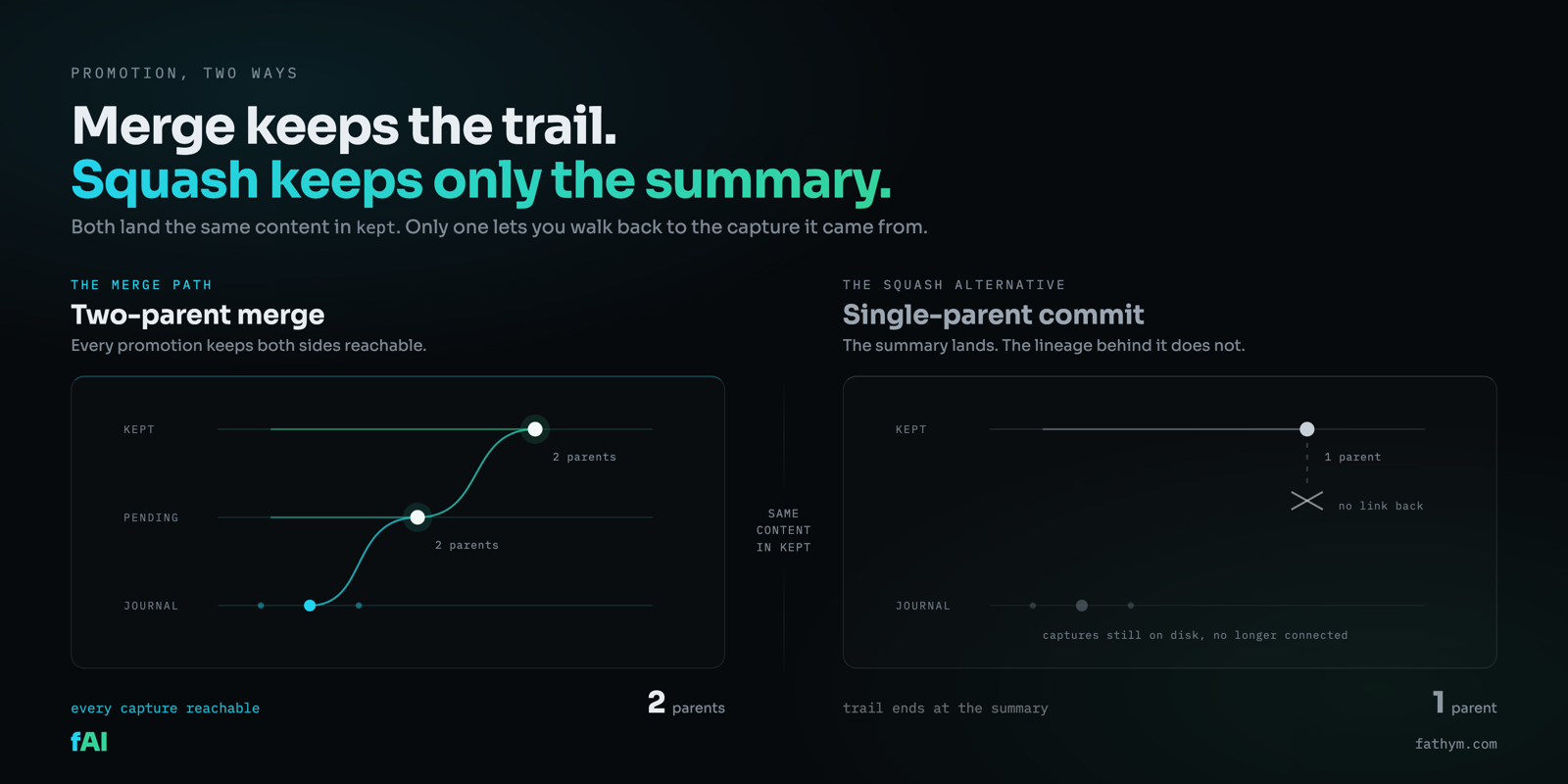
Settled work also flows back down, as fast-forwards rather than merges, so there is no merge commit to find for it. The trace it leaves is ancestry: merge-base --is-ancestor kept pending succeeds, because pending already contains everything kept has.
What can you inspect with git?
Four ordinary questions, four ordinary commands, none of which are features we built. They are what a git repository already is.
When did this enter the record? git log. Every capture is its own timestamped commit. The oldest is as readable as the newest, and it stays that way.
What changed in the synthesized context? git diff. Not what it knows now, which any file viewer can show you. What changed:
$ git -C ~/.fai/workbenches/<hash> diff --stat HEAD~6 HEAD
 $state.json                   |  14 +-
 .agent-response.md            |   2 +-
 FAI-PROJECT.md                | 406 +++++++++++++++++++++---------------------
 pages/architecture-design.md  |  99 +++++-----
 pages/conventions-patterns.md |  88 +++------
 pages/environment-build.md    |  15 +-
 pages/key-decisions.md        | 163 ++++++++++-------
 pages/vocabulary.md           |  19 +-
 8 files changed, 411 insertions(+), 395 deletions(-)
Those files are the synthesized picture of a project: its decisions, conventions, vocabulary. That is six commits of it being redrawn, and it reads like any other diff. Note how close the insertion and deletion counts are: pages get recompiled rather than appended to, so the file churns in place instead of growing forever.
Can I undo something? Usually you would not reach for git at all: you correct it in conversation, fAI captures the correction, and later synthesis carries it forward. But git revert is there. Many commits on kept are merges, so for a merge commit the form is git revert -m 1 <commit>, taking the first parent as the mainline. Because the layers are separate, it acts on the synthesis pass rather than the captures underneath.
Where did this come from? The commit object. Content, author, timestamp, parent. At the workbench level that points at the synthesis run; the raw session it came from is a commit in another repo in the same tree. Provenance is not a feature here, it is the shape of the data.
If a model rewrites the file every pass, how do I know it is not hollowing out?
Because the primary file your AI reads is not rewritten end to end by a model. It is assembled by code from model-generated section pages. Each section page gets compiled by the model from the records routed to it. The primary file, FAI-PROJECT.md, is then built by concatenating those page bodies under prescribed headings, in a prescribed order, with no model involved in that step. The source is blunt about why:
No LLM: the primary is a deterministic assembly, so it never drifts and never hollows.
That is a guarantee about structure rather than quality: the assembly keeps the headings and their order fixed, whatever the model does inside them. A file rewritten wholesale can quietly lose a section, and you would have to diff it to notice. Here a thin section shows up as a thin section rather than as a file that reorganized itself overnight.
How does one vault reach every agent?
Because the context lives outside every tool, no tool has to own it. fAI currently ships integrations for sixteen coding agents, including Claude Code, Cursor, Copilot, Windsurf, Codex, and JetBrains AI. It writes each one's native config and registers itself as an MCP server, so whichever you open already has your project context loaded.
One vault, read by all of them. Switching tools does not mean starting your context over, because the thing worth keeping was never inside the tool. We covered that in more depth in Your Sessions Don't Belong to Claude, and what accumulates in there over time in Your AI Finally Remembers.
Does owning your context make it private?
No, and it is worth being straight about that.
Local storage is not privacy. The moment your context goes into a prompt, it travels to whoever runs the model. A repository on your disk does not change that. If you want the prompt to stay on your machine too, you need the model there as well, which is a different setup.
What ownership buys is narrower and more durable. You can read your synthesized context, correct it, take it to another tool, and keep it after you stop paying anyone. No retention window, no export deadline, no support ticket. It is a folder, and it is yours. That is the economics of renting versus owning; here it is just the mechanics that make it true.
Install fAI, work for a week, then run git log on your own vault.
On macOS or Linux:
curl -fsSL https://www.fathym.com/fai/install.sh | sh
On Windows:
iwr -useb https://www.fathym.com/fai/install.ps1 | iex
git is the one prerequisite, since it does the actual work. The installer provisions it where it can, through Homebrew, apt, dnf, apk, pacman or winget, and where it cannot it says so and points you at the download rather than failing quietly.
Your vault stays in ~/.fai/. Yours to keep.
Build anything with AI. Keep everything. Evolve forever.
Read more: Your AI's Memory Expires in 30 Days ->
Two commands. Your vault loads in under 3 seconds.
deno run -A "https://www.fathym.com/fai/install.deno"New posts on AI workbenches, developer ownership, and compounding intelligence — when they're ready, not on a schedule.